IMPORTING CONTENT
Add to Songs Action Extension
The 'Add to Songs' action extension is part of the iOS/macOS 'Share' menu. Action extensions are used to share content between different apps.
The 'Add to Songs' action extension enables you to add ChordPro-formatted content displayed in Apple’s Safari browser to your song catalog. It can also be used to import content you have created with other chord sheet apps into the Songs app.
The share menu is accessed by tapping/clicking on the iOS/macOS export/share icon.

|
'Add to Song' will automatically appear as an option in the 'Share' menu if the Songs app can import the shared content. |
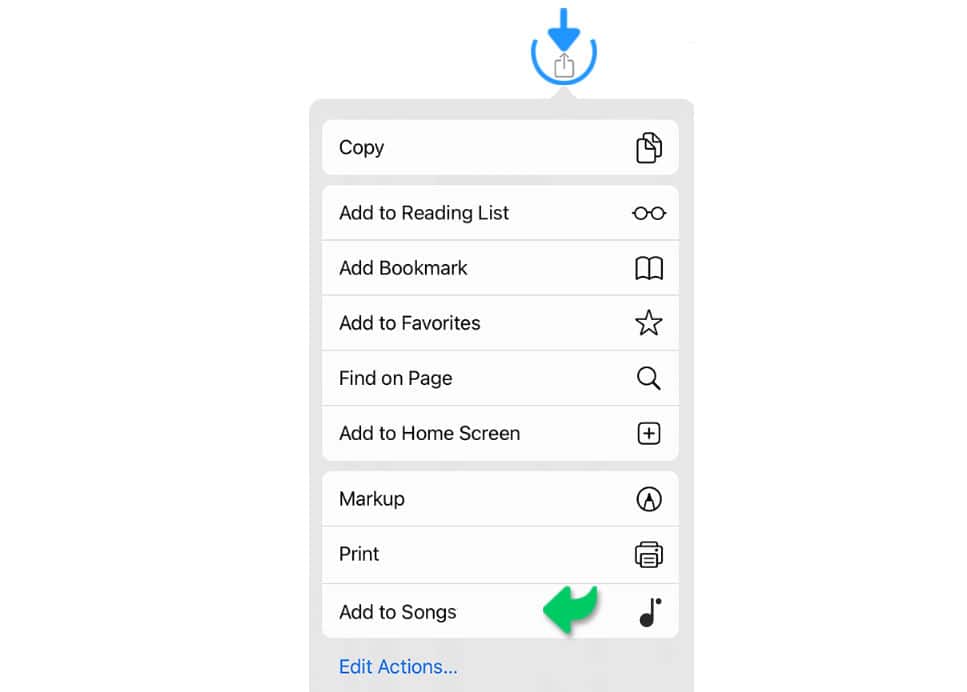
|
|
The chosen content is automatically added to your song catalog the next time you open the Songs app (iOS) or when you move the Songs app’s app window back into the foreground (macOS). |
If the action extension "Add to Songs" is not visible it needs to be enabled first:
iOS

|
On iOS select "Edit Actions…" from the Share menu and enable the "Add to Songs" action. (If the Action extension cannot be found under "Edit Actions…", restart your iOS device.) |
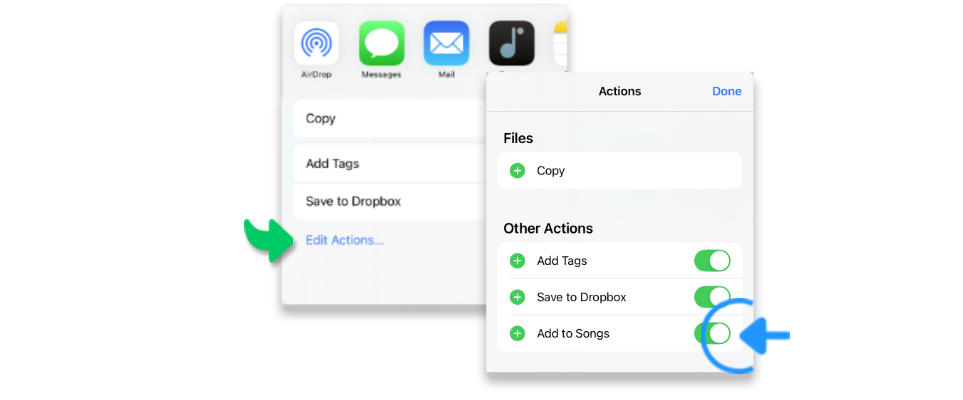
macOS
|
|
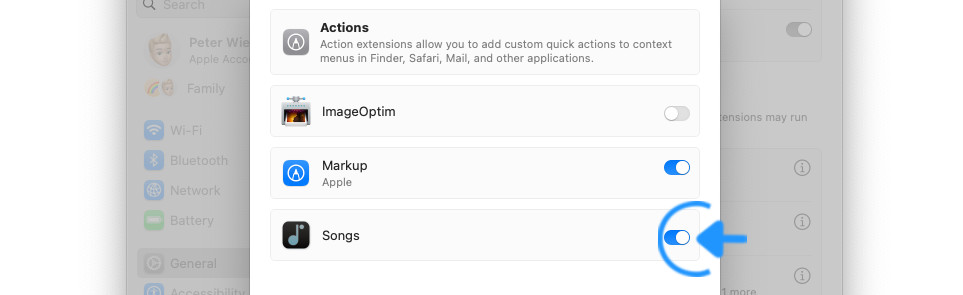
On macOS navigate to the 'Login Item & Extensions' window of the macOS system settings (Apple icon (top left) > System Settings > General > Login Items & Extensions). |
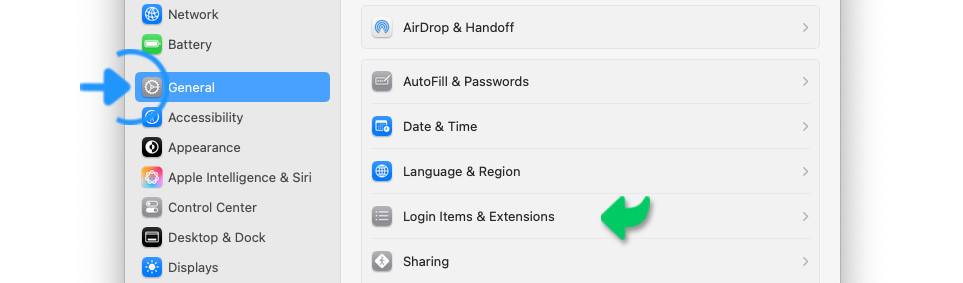
|
|
Scroll to the bottom of the 'Login Items & Extensions' window and click on the circled 'i' next to 'Actions'. |
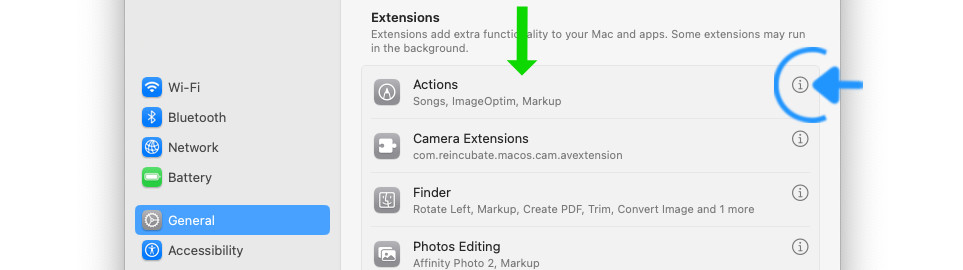
|
|
Enable the 'Songs' action extension via the slider. |
Sharing Content Between Apps
The type of data that can be shared between different apps depends on the supported file formats. E.g.:
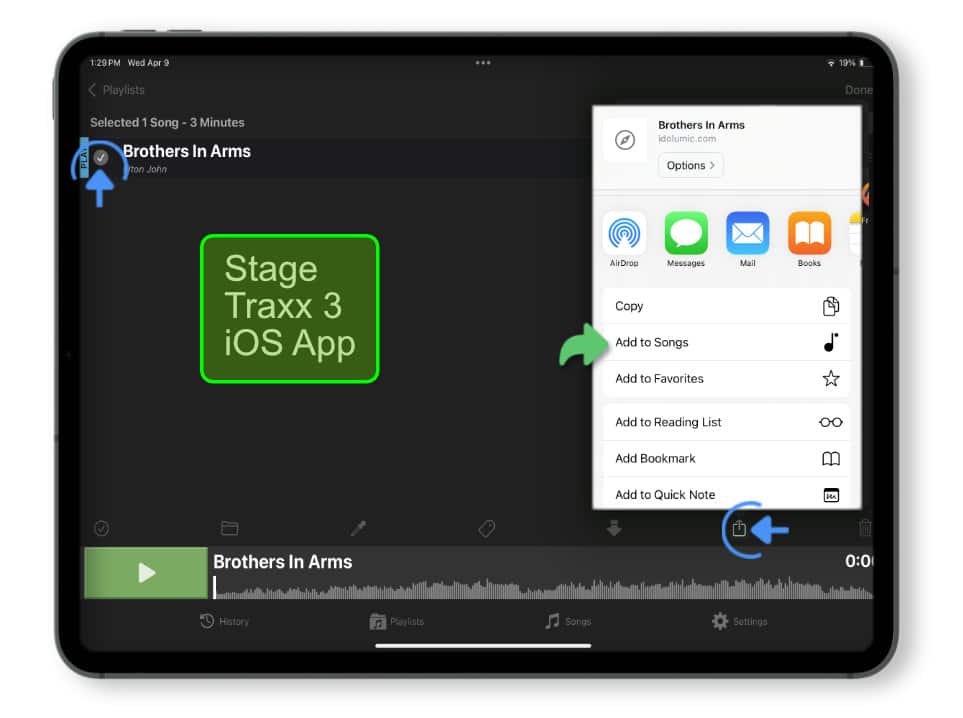
The Stage Traxx 3 * app supports sharing your songs (including backing tracks) in the native file format (.stsa) when you select the song in the library and then tap/click on the share button:
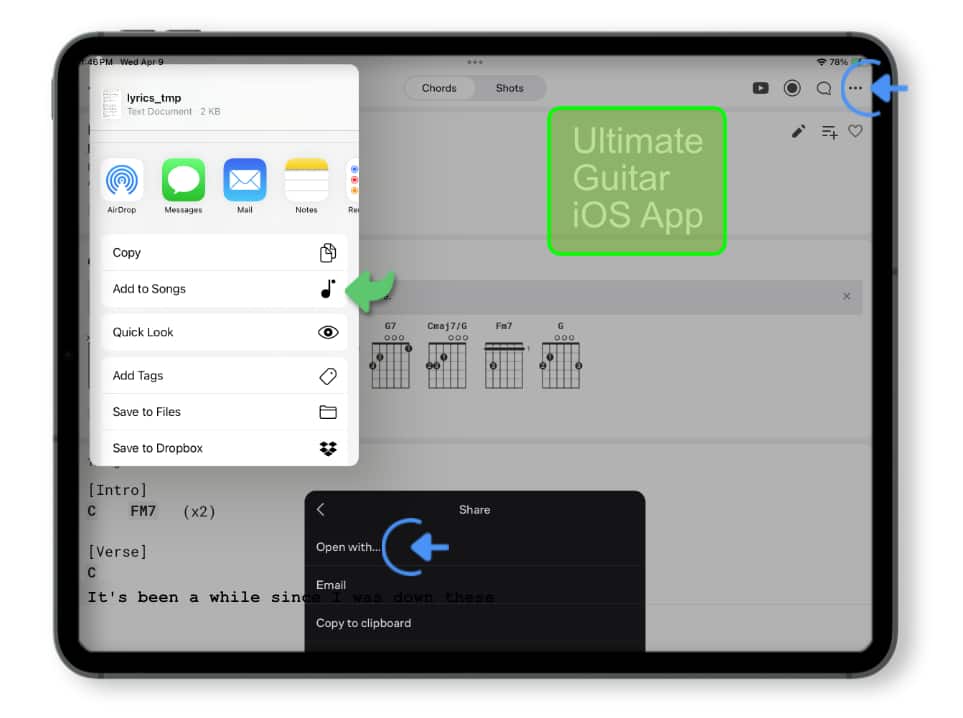
The Ultimate Guitar * app supports sharing your songs in the plain text format when you tap/click on the three dots in the upper right corner and open the 'Share' submenu:
|
|
The Songs app supports a variety of file formats including OnSong *, StageTraxx 3 *, Songsheet Pro *, SongbookPro *, ChordPro, simple text and PDF. Consult the user guide of your third party app to learn how to share your songs. |
* The Songs app is not affiliated with or endorsed by OnSong, Stage Traxx 3, Songsheet Pro, SongbookPro or Ultimate Guitar. Any use of third party trademarks, logos, brand names and products is only referential.
Plain Text Format
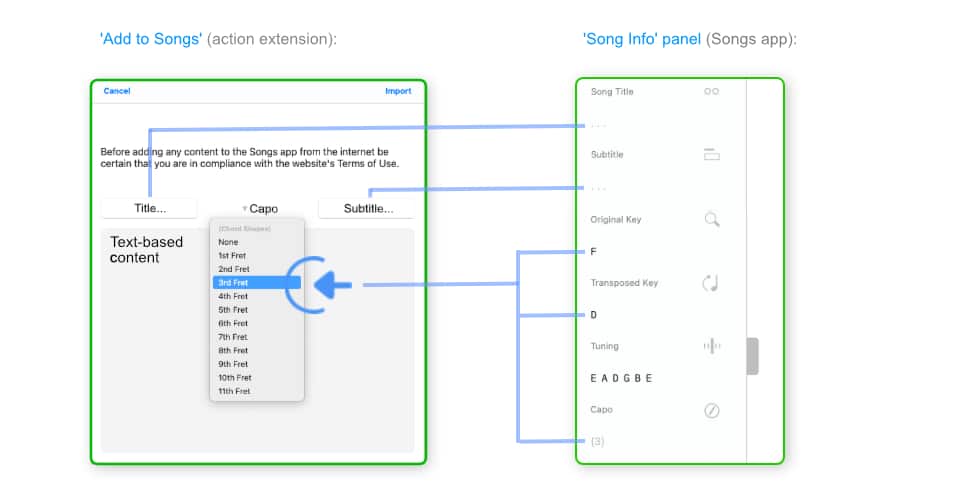
When importing content in the plain text format you have the option to specify the 'Title' and 'Subtitle' in the 'Add to Songs' action extension.
|
|
Easily add songs with capo based chord shapes via the 'Add to Song' action extension: Specify the capo position and click/tap on the 'Import' button to have the song’s original and transposed key identified automatically. |
Apple’s Safari Browser
The 'Add to Songs' action extension enables you to add ChordPro formatted content displayed in Apple’s Safari browser to your song catalog.
Alternatively you may also use the Songs app’s 'Import Clipboard' menu option to import and auto-format text that you have selected in Apple’s Safari browser and copied to your device’s clipboard.
To import content via the 'Add to Songs' action extension:
|
|
Open the webpage in Apple’s Safari browser, tap on Safari’s share icon and select the 'Add to Songs' action extension from the share menu. |
|
|
When ChordPro formatted content is not found you will have to select the specific text section you wish to import prior to launching the 'Add to Songs' action extension. |
The 'Add to Songs' action extension looks for ChordPro syntax in the publicly accessible text section of a webpage. A pop-up window allows you to review the identified ChordPro content:

|
|
Tap on 'Import' to add the clipboard content to your song catalog. |
|
|
Tap on 'Cancel' to discard the clipboard content and close the Action extension. |

|
Before adding any content to the Songs app from the internet be certain that you are in compliance with the website’s Terms of Use. |
|
|
The chosen content is automatically added to your song catalog the next time you open the Songs app (iOS) or when you move the Songs app’s app window back into the foreground (macOS). |
Please note that the legitimate sale of sheet music is a vital part of an artist’s livelihood. The Songs app provides you with the mechanism of importing text-based content and recognizing plain text chord symbols to auto-generate chord charts. It is solely your responsibility to ensure that you are not infringing upon intellectual property rights and that you are abiding by all copyright laws.